


10 Best FLAC to MP3 Converters for Windows PC, Mac, and Online [Truly Free]
""What is the best converter for FLAC to MP3?" - Jake Arnott
FLAC and MP3 are popular audio formats used for storing and playing digital music. While FLAC offers lossless audio quality, MP3 provides a smaller file size. Converting FLAC to MP3 allows for compatibility with a wider range of devices and reduces file size without significant loss in audio quality. This article aims to present a list of the best 10 FLAC to MP3 converters that are truly free.
- • Part 1: FLAC vs. MP3 - Comparison between FLAC and MP3
- • Part 2: Top 5 Free FLAC to MP3 Converters for Windows PC and Mac
- 2.1 Any Video Converter
- 2.2 foobar2000
- 2.3 Audacity
- 2.4 VLC Media Player
- 2.5 fre:ac
- • Part 3: Top 5 Online Free FLAC to MP3 Converters
- 3.1 Convertio
- 3.2 FreeConvert
- 3.3 CloudConvert
- 3.4 Restream.io
- 3.5 Zamzar
- • Part 4: Criteria for FLAC to MP3 Converter Selection
- • Part 5: FAQ about FLAC to MP3
| Category | FLAC | MP3 |
| File Extension | .flac | .mp3 |
| Associated Programs | foobar200, VLC, Windows Media Player, RealPlayer | Windows Media Player, iTunes, VLC, MPlayer |
| Developer | Xiph.Org Foundation | Moving Picture Experts Group |
| Audio Quality | Lossless (CD quality: 44.1 kHz / 16-bit); Hi-Res (96 kHz or 192 kHz / 24-bit); Ultra Hi-Res (352.8 kHz or 384 kHz / 32-bit) | Lossy (32-320kbps) |
| File Size | Very Large (approx. 60MB in 3-minute length) | Smaller (9MB in 320kbps after conversion) |
| Recommended Bitrate | N/A | 256-320 kbps |
| Device Compatibility | Limited | Universal |
| Best for | Archiving; Audiophile | Daily Listening & Storage & Streaming |
Part 2: Top 5 Free FLAC to MP3 Converters for Windows PC and Mac
Converting FLAC files to the more widely supported MP3 format is a common need for many users. Luckily, there are several free converters available for both Windows and Mac that make this task simple and convenient. In this part, we will explore the top 5 FLAC to MP3 converters that are totally free for both operating systems.
Here is the comparison of these top 5 FLAC to MP3 converters free for Windows PC and Mac:
| FLAC to MP3 Converter | Any Video Converter | foobar2000 | Audacity | VLC Media Player | fre:ac |
| Compatibility | Windows, macOS | Windows, macOS, Linux, Android, iOS | Windows, macOS, Linux | Windows, macOS, Linux, Android, iOS | Windows, macOS, Linux |
| Output Quality | 48-320kbps | 65(V9)-320(CBR)kbps | 8-320kbps | 128-320kbps | 8-320kbps |
| *Conversion Speed | 10s/5 files | 5s/5 files | 1s/5 files | 16s/5 files | 7s/5 files |
| Bulk Conversion | ✅, no limited | ✅, no limited | ✅, a bit complicated | ✅, no limited | ✅, no limited |
| Supported Audio Formats | FLAC, MP3, OGG, WAV, M4A, Opus, etc | AAC, AIFF, MP3, FLAC, WEAV, OGG, Opus, etc | MP3, WAV, FLAC, OGG, M4A, MP2, AMR, WMA,AC3 | OGG, MP3, FLAC, CD | AAC, FLAC, MP3, OGG, WMA |
| Additional Features | Audio download, audio to text, vocal removal, etc | Versatile audio player, ripping CD, built-in DSP effects, ReplayGain | Audio editing, vocal removal, background noise removal | Versatile media player | CD ripper |
| Download | Windows, macOS | Download Now | Download Now | Download Now | Download Now |
*Test specs during this FLAC to MP3 conversion:
- Test environment: 13th Gen Intel(R) Core(TM) i9-13900HX (2.42 GHz) & NVIDIA GeForce RTX 4060
- Source files: 5 purchased FLAC files, 86MB in size and 13 min 37 secs duration
- Output format: MP3
2.1 Any Video Converter
Any Video Converter is a versatile software that truly supports converting FLAC files to MP3 and various other formats in batch for free, with no hidden or additional fees. You can easily add FLAC files, select the MP3 format, and start the conversion process with just a few clicks. It also enables users to customize the output audio options, such as audio encoder, bitrate, sampling rate, etc. What's more, it offers a user-friendly interface and additional features like audio editing (audio to text, audio filter, vocal remover) and downloading (from YouTube, YouTube Music, SoundCloud, etc).

🔴 Convert multiple audio files in batch.
🔴 Fast conversion speed.
🔴 Support downloading audio from 1000+ sites.
🔴 Trim audio before or after conversion.
⚫ It does not support ID3 tags editing.
How to Convert FLAC to MP3 for Free with Any Video Converter
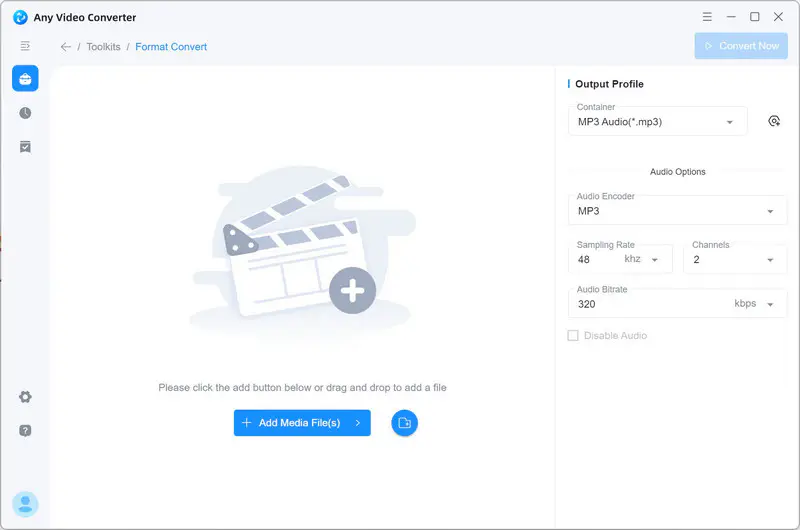
Step 1: Add FLAC Files
Open the Format Convert tool in Any Video Converter and click the 'Add Media File(s)' button to add FLAC files or
click  to add an entire
folder.
to add an entire
folder.
Step 2: Choose MP3 as the Output Format
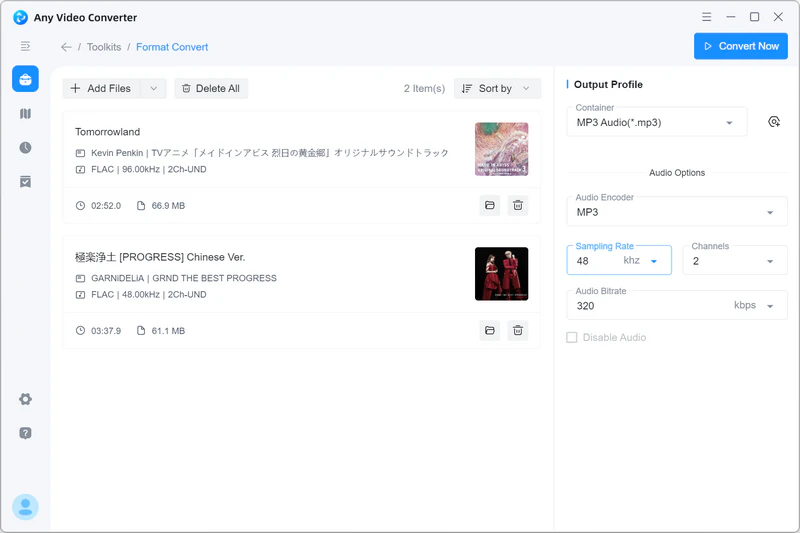
In the right panel, you can choose MP3 as the output format and audio quality to 320kbps.
Step 3: Convert FLAC to MP3 for Free
Click the 'Convert Now' button in the upper right to convert FLAC to MP3 in batch for free.
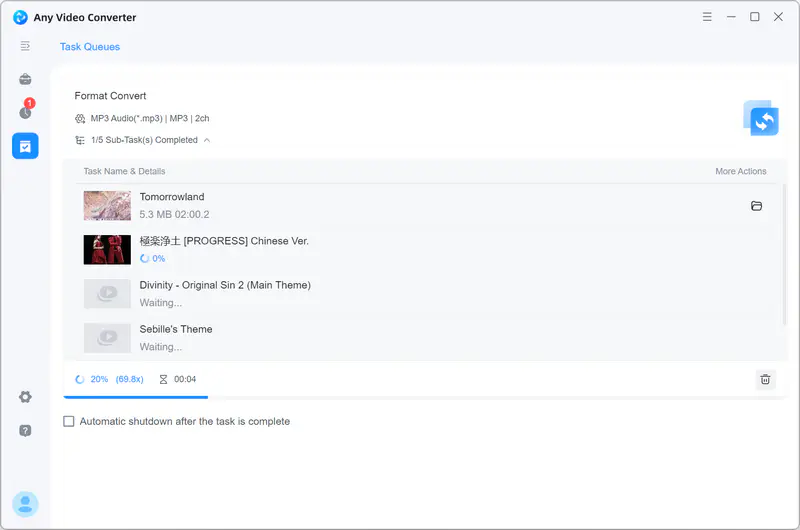
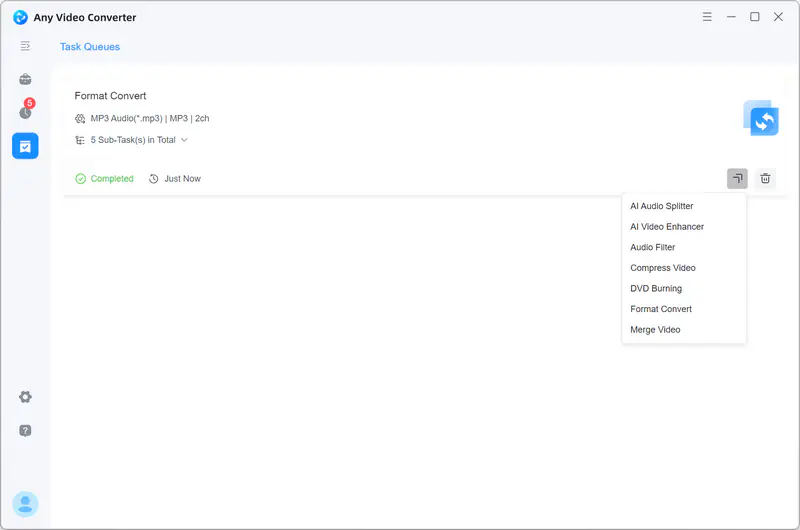
After successful conversion, you can click  for further editing of
your audio files.
for further editing of
your audio files.
2.2 foobar2000
foobar2000 is not only a versatile and powerful music player that can handle massive music libraries and rare codecs, but also a free and easy to use FLAC to MP3 converter that supports LAME encoder, which delivers better sound quality.
🔴 Supports LAME encoder, ensuring higher-quality MP3 output after conversion.
🔴 Fully customizable, from the interface to plugins.
⚫ Less refined experience on macOS compared to Windows.
How to Convert FLAC to MP3 for Free with foobar2000
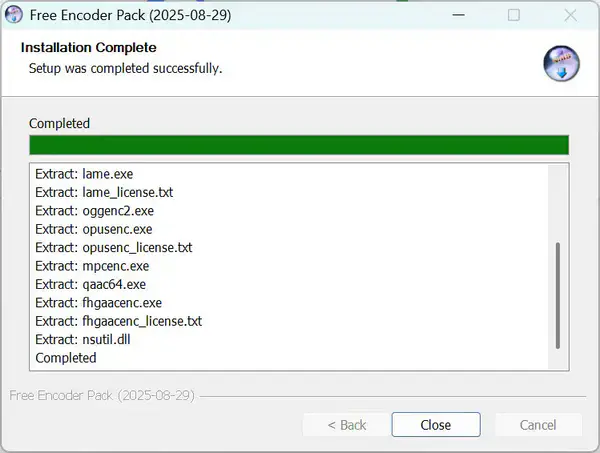
Step 1: Download and Install the Free Encoder Pack
First, download the free encoder pack. It includes all natively supported encoder binaries for the foobar2000 converter component.
Next, click the pack to begin installation. The binaries are automatically placed in the encoder subfolder of your foobar2000 installation.
Step 2: Add FLAC Files to foobar2000
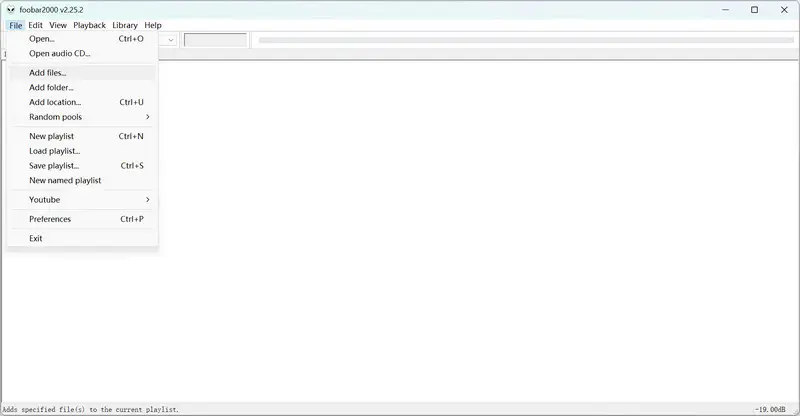
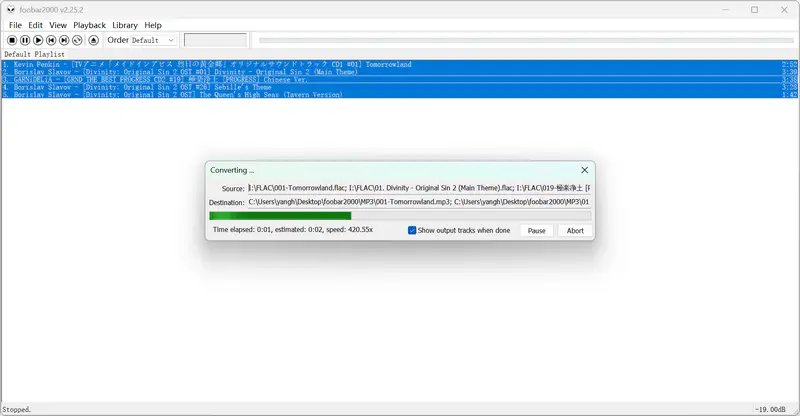
Launch foobar2000, then click 'Add files' or 'Add folder' to add FLAC files or a folder.
Step 3: Choose MP3 as the Output Format
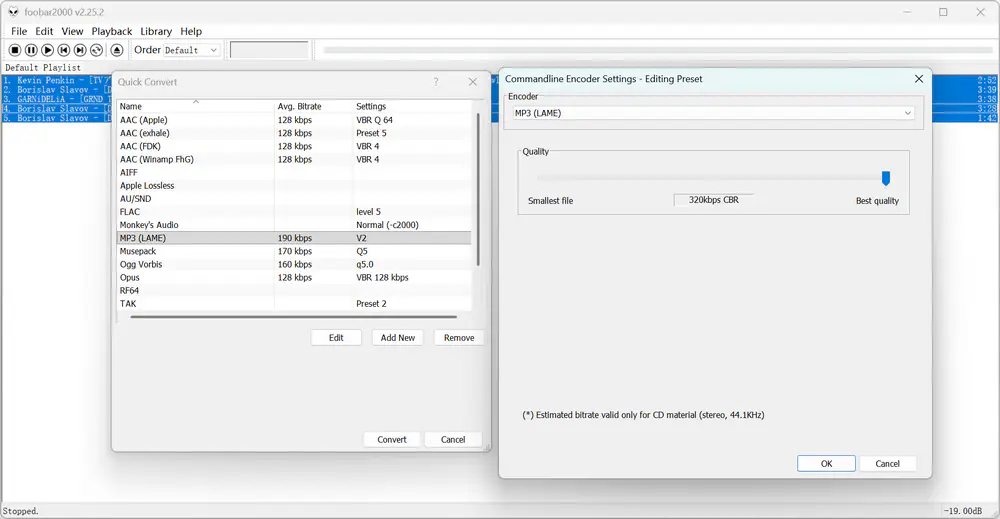
Select all FLAC files. Right-click, then choose 'Convert' → 'Quick convert'.
Choose 'MP3 (LAME)' from the list and click 'Edit' to move the quality slider to 'Best quality' for optimal results.
Step 4: Start the Conversion
Click 'OK' to save your settings. Click 'Convert' to choose where to save your MP3 files and start the FLAC to MP3 conversion.
2.3 Audacity
Audacity is an open-source audio editor that also supports converting FLAC to MP3. It offers an extensive range of audio editing capabilities, making it a versatile tool for audio enthusiasts. With Audacity, you can not only convert FLAC files to MP3 but also edit and enhance the audio quality according to your preferences.
🔴 Fast conversion.
🔴 It features background noise removal and vocal removal.
⚫ It has a bit of a learning curve for batch conversion.
How to Batch Convert FLAC to MP3 for Free with Audacity
Batch conversion in Audacity can be a bit complicated, so this guide walks you through a clear, step-by-step way to convert FLAC to MP3 in batch.
Step 1: Set up MP3 Output
Open Audacity, then click 'File' → 'Open' and select only one FLAC file.
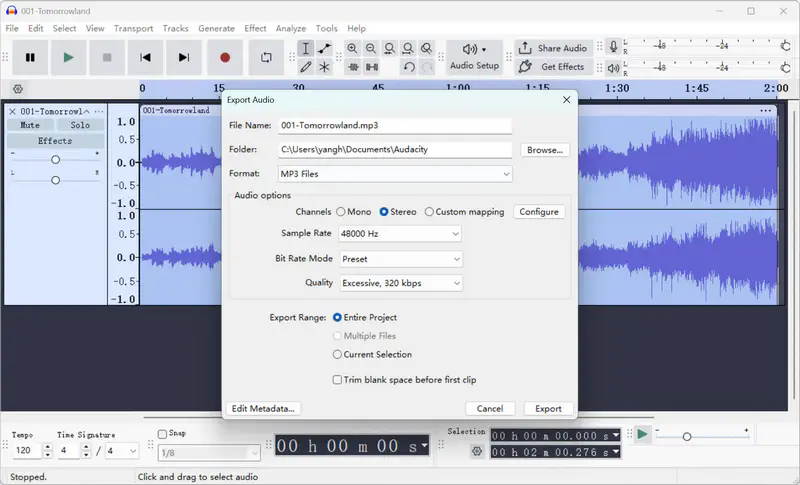
Go to 'File' → 'Export Audio' → 'Export to computer', then choose the MP3 as the format, and customize the audio options you prefer (channel, sample rate, bitrate, and quality).
Click 'Export' to convert the current file to MP3 and save your preference.
Step 2: Apply the Macro to Batch Process
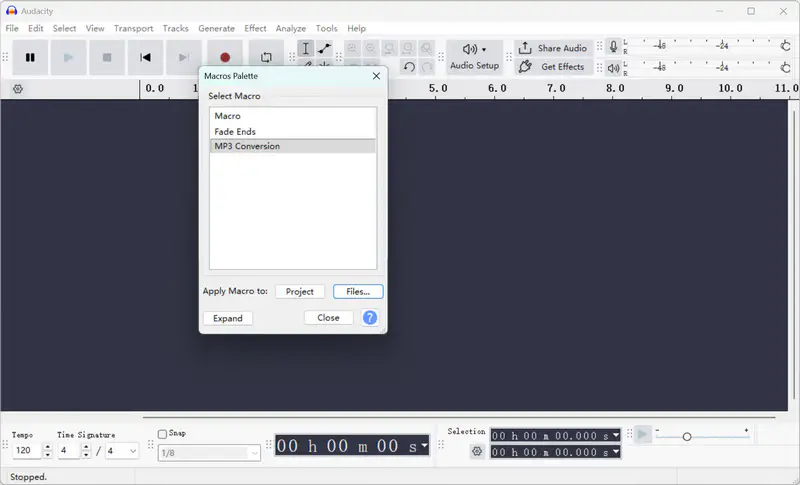
Because the Macro is already created, you only need to apply it to your task. Before you do, close the current project or remove the file.
Go to 'Tools' → 'Apply Macro' → 'Palette' → 'MP3 Conversion', then click 'Files' to open and choose the folder containing your FLAC files.
Step 3: Batch Convert FLAC to MP3
Audacity will automatically process and save the converted MP3s in seconds. The converted files are often in a new "macro output" subfolder.
2.4 VLC Media Player
VLC Media Player, known for its versatility as a video player, can also convert FLAC files to MP3. It is a widely used media player that supports various audio and video formats. With VLC, you can easily add your FLAC files and convert them to MP3 with a few simple steps, all within the familiar VLC interface.
🔴 Support multiple formats.
⚫ It does not support editing and preserving the metadata.
⚫ Conversion options are limited compared to other converters.
How to Convert FLAC to MP3 for Free with VLC Media Player
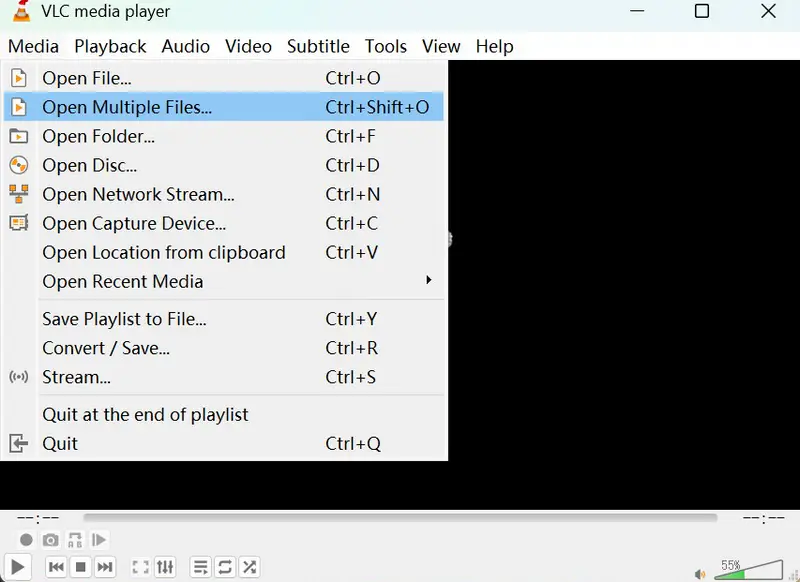
Step 1: Add FLAC files to VLC. Launch VLC, then click 'Media' → 'Open Multiple Files' to add FLAC files for batch conversion.
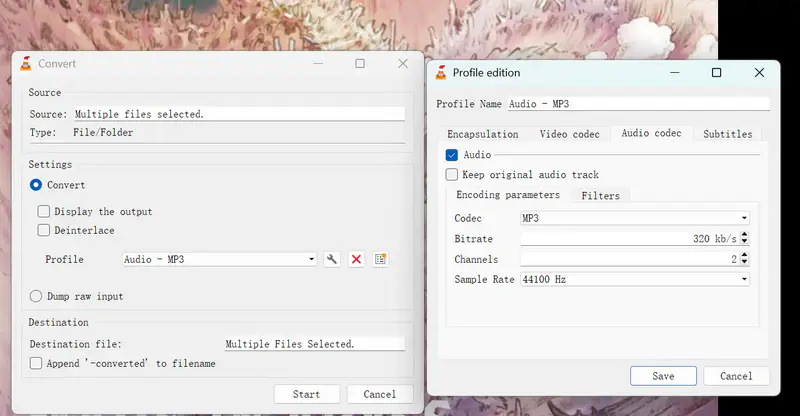
Step 2: Choose MP3 as the output format. Click 'Convert' from the dropdown menu next to Play, then select 'Audio - MP3' from the list. Then, click the 'Tools' icon → 'Audio codec' to adjust settings like codec, bitrate, channels, and sample rate.
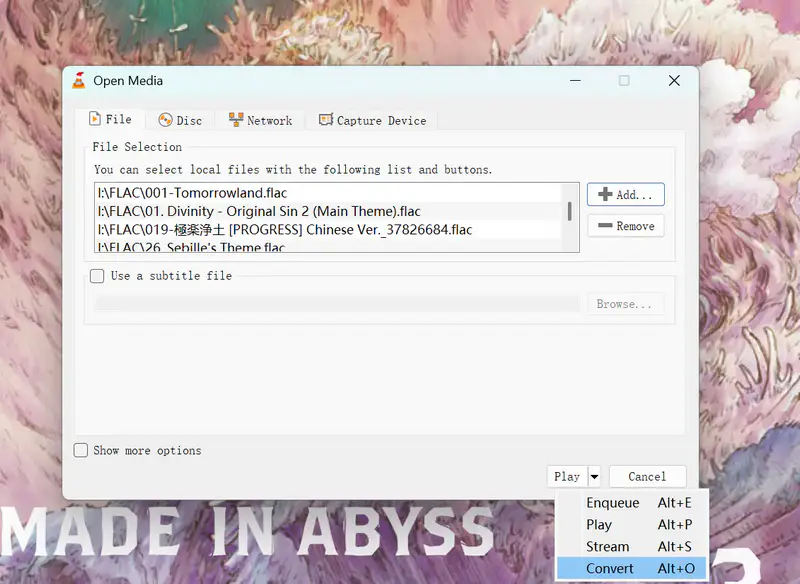
Step 3: Start converting FLAC to MP3. Click 'Save' to save your preferences and click 'Start' to start the conversion.
2.5 fre:ac
fre:ac (Free Audio Converter) is an open-source audio converter and CD ripper. It lets you convert FLAC to MP3 for free in batch. Compared with foobar2000 or Audacity, fre:ac is faster to start and easier to use, with virtually no learning curve. As a dedicated audio converter, it supports a wide range of audio formats and lossless encoders, and it includes built-in tag editing for clean, well-organized files.
🔴 Multi-core optimization for fast conversion.
⚫ It lacks custom settings such as sample rate and channel, which means it cannot save stereo (2-channel) audio.
How to Convert FLAC to MP3 for Free with fre:ac
Step 1: Add FLAC files. Click 'File' → 'Add' → 'Audio files' to open FLAC files.

Step 2: Choose MP3 as the output format. From the encoder list, select 'LAME MP3 Encoder', then click the 'Settings' button to fine-tune your options. Set the preset to Custom settings, ABR target bitrate to 320 kbps, and set quality to better.
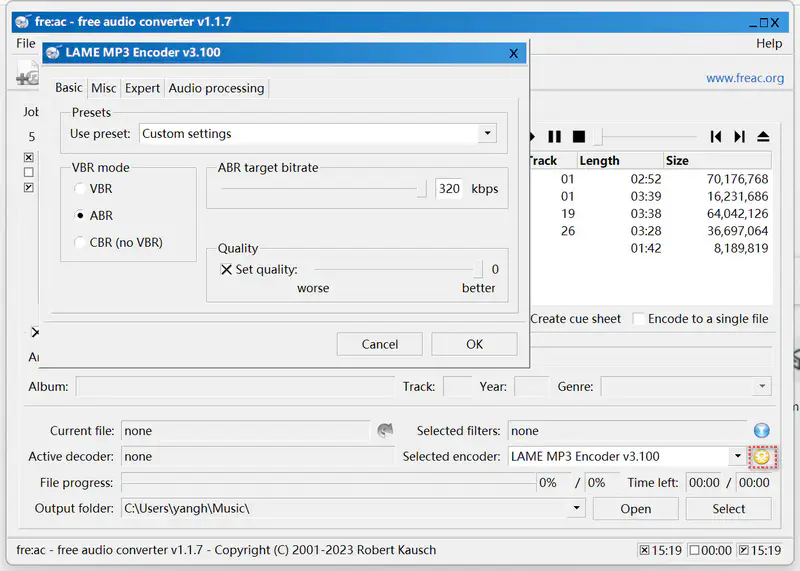
Step 3: Start encoding. Click the play button in the top menu bar to start encoding FLAC to MP3.

Part 3: Top 5 Online Free FLAC to MP3 Converters
If you prefer an online free audio converter that allow you to effortlessly convert FLAC files to MP3 without the need to install any software, you can find a suitable one in this section.
Comparison of the Top 5 Online Free FLAC to MP3 Converters
| Online FLAC to MP3 Converter | Convertio | FreeConvert | CloudConvert | Restream.io | Zamzar |
| Output Quality | 85-320kbps | 45-320kbps | N/A | Low | 64-320kbps |
| Conversion Speed | 10s/file | 43s/5 files | 2mins/5 files | 15s/file | 5mins/5 files |
| Supported Audio Formats | MP3, WAV, M4A, OGG, AIFF, AAC, OPUS, WMA, M4R, AC3, etc | MP3, WAV, M4A, OGG, AIFF, AAC, WMA, M4R, etc | AAC, AIFF, FLAC, M4A, MP3, WAV, WMA | MP3, WAV | AAC, AC3, M4A, M4R, MP3, OGG, WAV |
| Bulk Conversion | 2 files in the free version | ✅, no limit | ✅, no limit | ❌ | ✅, no limit |
| Additional Features | Trim audio | Trim audio | Trim audio | ❌ | Fade in and out |
3.1 Convertio
Convertio is a popular online file conversion platform that supports a wide range of formats, including FLAC to MP3. With its user-friendly interface, you can easily upload your FLAC files and convert them to MP3 in just a few simple steps. Convertio also provides options to customize the output settings, such as bitrate and audio quality.
🔴 Customizable audio output settings.
⚫ You cannot apply the same output format to all files.
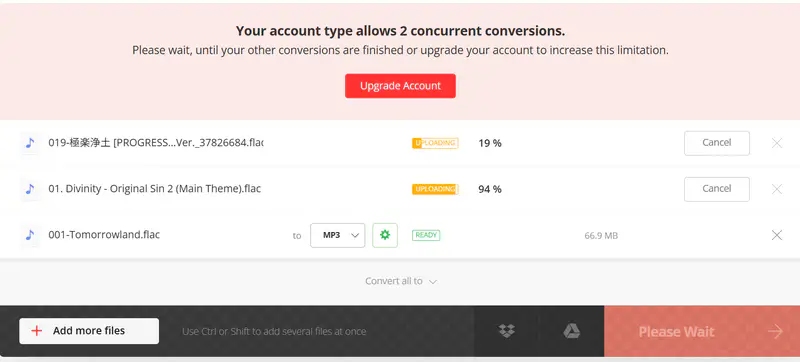
⚫ The free version only allows 2 concurrent conversions.
How to Convert FLAC to MP3 Online Free with Convertio
Step 1: Upload FLAC files. Open the official site of Convertio, then click 'Choose Files' to upload FLAC files.
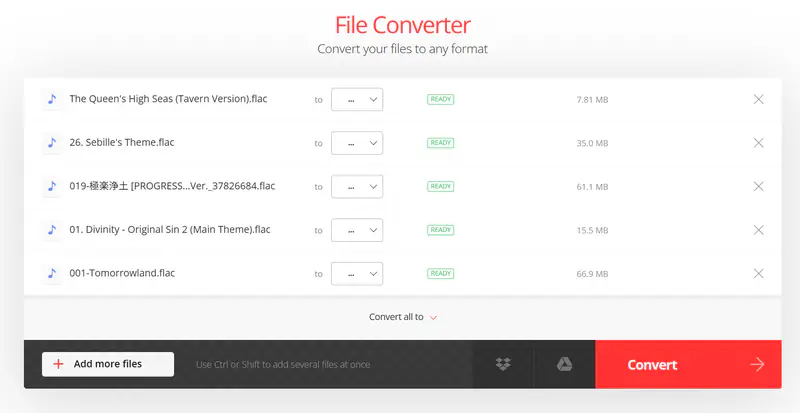
Step 2: Choose MP3 as the output format. Click ' ...' to choose MP3 from the list, then click the settings icon to adjust the output preference: select 'Constant Bitrate', the Bitrate to 'Very high', Audio Channels to Mono, Stereo, or Auto, and Frequency to Auto or any value you prefer.
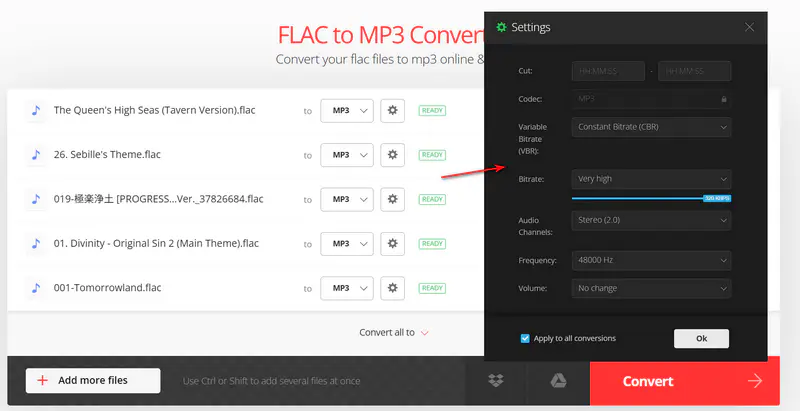
Step 3: Start converting FLAC to MP3 online for free. Click the 'Convert' button to start converting FLAC to MP3.
3.2 FreeConvert
FreeConvert is a versatile online file conversion platform that offers a seamless FLAC to MP3 conversion process. It supports batch processing, allowing you to convert multiple FLAC files to MP3 simultaneously. Additionally, FreeConvert provides various customization options, including bitrate selection and audio quality adjustment.
🔴 No registration required.
⚫ The site contains ads.
How to Convert FLAC to MP3 Online Free with FreeConvert
Step 1: Upload FLAC files. Go to the official site of FreeConvert, then click 'Choose Files' to upload FLAC files.
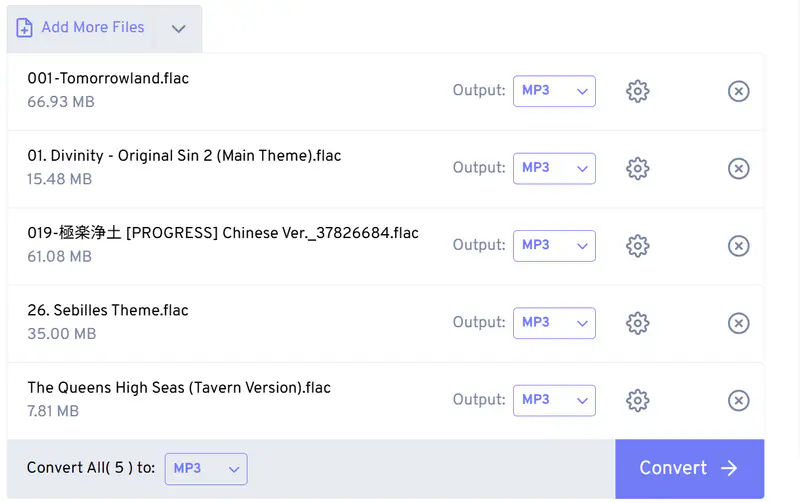
Step 2: Choose MP3 as the outout format. After uploading, change 'Convert All to' to MP3, then click the Settings button to customize the output settings and apply settings to all files.

Step 3: Start converting FLAC to MP3 online for free. Click the 'Convert' button to start converting FLAC to MP3.
3.3 CloudConvert
CloudConvert is a feature-rich online file conversion service that enables you to convert FLAC files to MP3 effortlessly. It offers a seamless user experience with drag-and-drop functionality, making it easy to upload and convert files. Cloudconvert also provides advanced options like trimming audio and adjusting volume levels.
🔴 Advanced audio editing options.
How to Convert FLAC to MP3 Online Free with CloudConvert
Step 1: Upload FLAC files. Go to the official CloudConvert site, then click 'Select File' to upload your FLAC files.
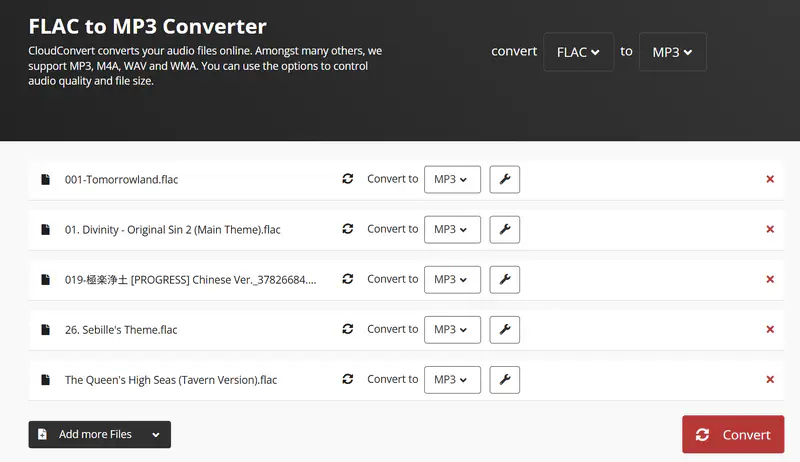
Step 2: Choose MP3 as the output format. At the top, you can choose MP3 as the output format, which will apply the same format to all files. Then click the 'Tools' icon to customize the audio options and apply them to all files.
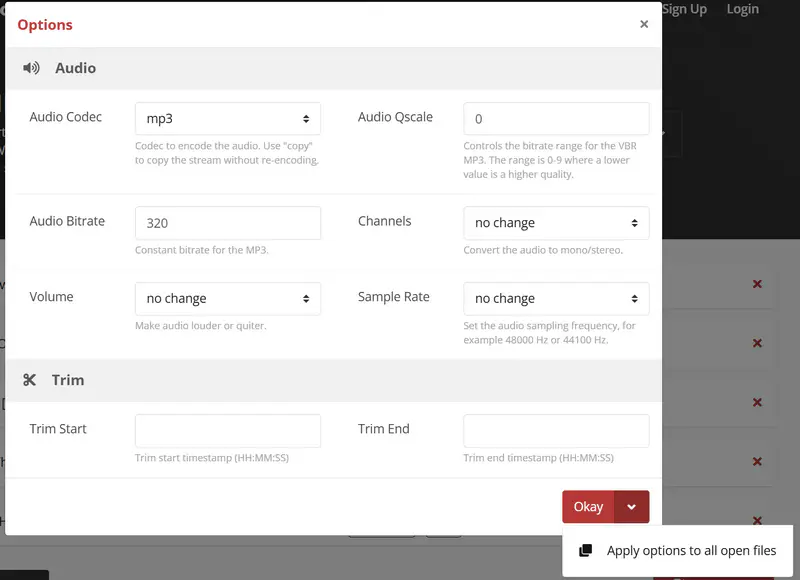
Step 3: Start converting FLAC to MP3 online for free. Click the 'Convert' button to start converting FLAC to MP3.
3.4 Restream.io
Restream.io is primarily known as a live streaming platform; however, it also offers a convenient online FLAC to MP3 converter. With Restream.io, you can upload your FLAC files and convert them to MP3 effortlessly. While it may not provide extensive customization options, it is a reliable and straightforward option for quick conversions.
🔴 Fast conversion process.
⚫ Limited output formats and customization options.
How to Convert FLAC to MP3 Online Free with Restream.io
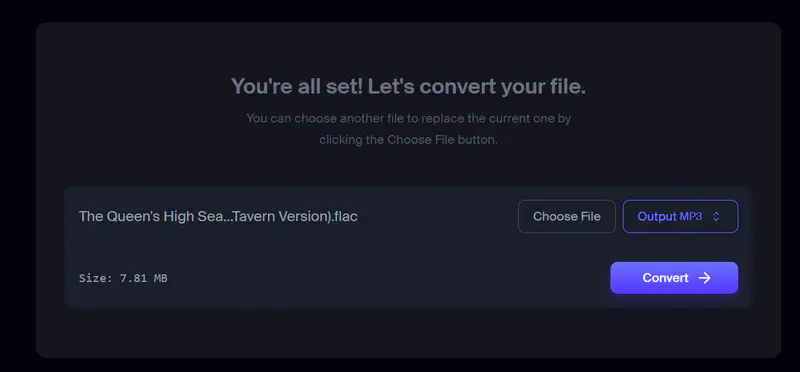
Step 1: Upload FLAC files. Go to the audio converter page of Restream.io, then click 'Choose File' to upload a FLAC file.
Step 2: Choose MP3 as the output format.
Step 3: Start converting FLAC to MP3 online for free. Click the 'Convert →' button to start converting FLAC to MP3.
3.5 Zamzar
Zamzar is a well-established online file conversion platform that supports various formats, including FLAC to MP3. With its user-friendly interface, you can easily upload your FLAC files and convert them to MP3 within minutes. Zamzar also provides options to receive the converted files via email or download them directly.
🔴 Option to receive converted files via email.
🔴 Quick and efficient conversion process.
How to Convert FLAC to MP3 Online Free with Zamzar
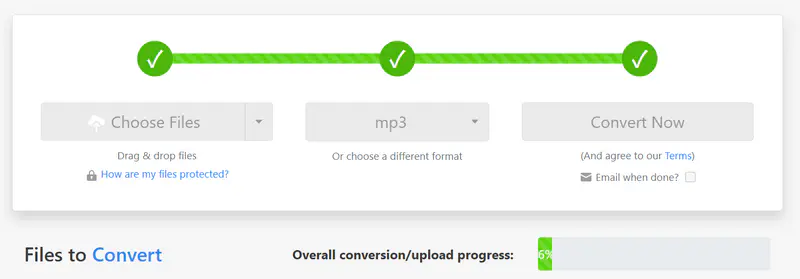
Step 1: Upload FLAC files. Go to the MP3 converter page of Zamzar, then click 'Choose Files' to upload FLAC files.
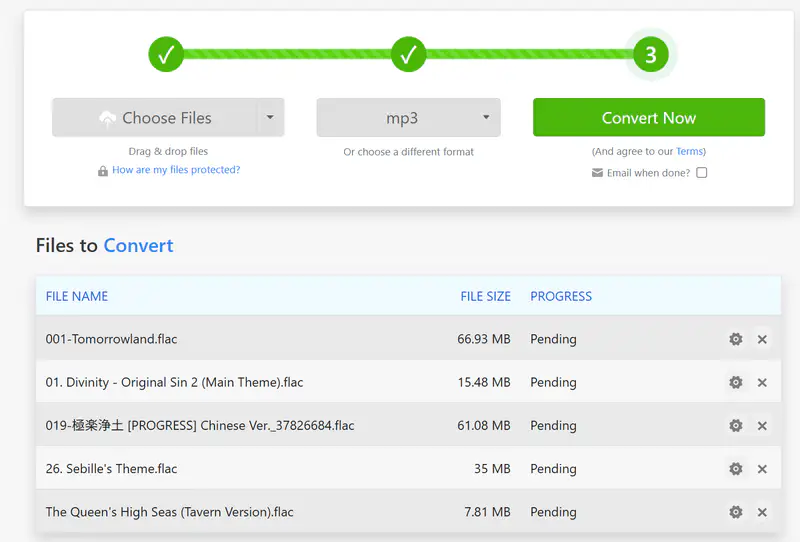
Step 2: Choose MP3 as the output format. Select MP3 from the audio format list. A prompt will appear, allowing you to adjust the bitrate, sample rate, channels, and volume.
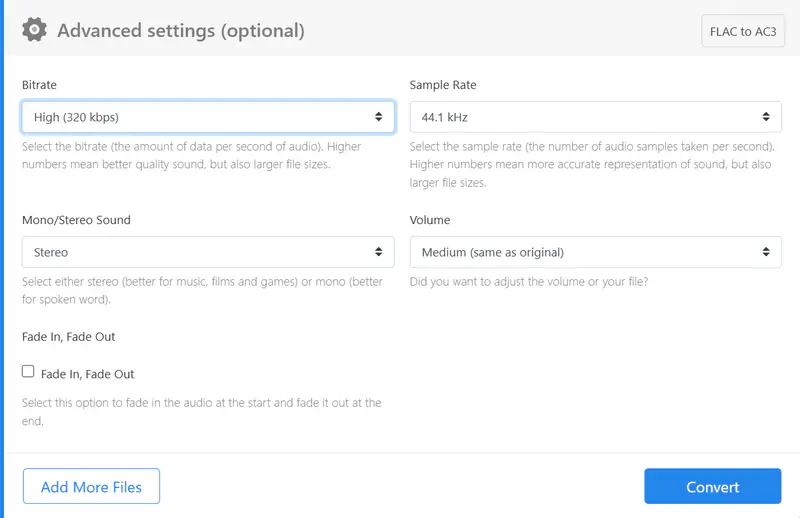
Step 3: Start converting FLAC to MP3 online for free. Click the 'Convert' button to start converting FLAC to MP3.
Part 4: Criteria for FLAC to MP3 Converter Selection
The following criteria were used to evaluate and select the FLAC to MP3 converters:
Platform Compatibility: Check if the converter is compatible with the operating system you are using, such as Windows, Mac, or Linux, to ensure smooth installation and usage.
Output Quality: The converter should maintain the audio quality during the conversion process and produce MP3 files with good sound fidelity (up to 320 kbps).
Conversion Speed: The converter should support batch conversion at a faster speed.
Additional Features: Some converters may offer extra features like batch conversion, audio editing options, tag editing and preservation, audio downloading, and more.
Part 5: FAQ about FLAC to MP3
Q1: What is the best FLAC to MP3 converter?
Based on the criteria for choosing a FLAC to MP3 converter, such as output quality, conversion speed, bulk conversion, metadata preservation, free and unlimited conversion, and additional features like audio downloading and audio editing, Any Video Converter is your best FLAC to MP3 converter. If it supports ID3 tags editing, the better.
Q2: Can you convert FLAC to MP3 without losing quality?
No, I can't. MP3 is a lossy format, so some data will be lost to some extent to keep its smaller size. To keep a better quality after converting FLAC to MP3, you can choose LAME as the audio codec, and the audio bitrate to 320 kbps.
Q3: Can you use VLC to convert FLAC to MP3?
Yes, VLC can convert FLAC to MP3 in batch for free. You can follow the simple steps below:
Step 1: Click 'Media' → 'Open Multiple Files' to add FLAC files for batch conversion.
Step 2: Click 'Convert' from the drop-down menu next to 'Play', then select 'Audio - MP3' from the list. Then, click the 'Tools' icon → 'Audio codec' to adjust settings like codec, bitrate, channels, and sample rate.
Step 3: Click 'Save' to save your preferences and click 'Start' to start converting FLAC to MP3.
Q4: Is FLAC higher quality than MP3?
Yes, definitely, FLAC has much better quality than MP3, as FLAC is a lossless format that captures the original quality. MP3 is lossy to seek the best balance between audio quality and file size.
Q5: What are the disadvantages of FLAC?
Although FLAC delivers excellent audio quality, it isn't the best choice for everyone. It's most suitable for audiophiles and professional use.
Its main drawbacks are clear: larger file sizes, limited device compatibility, and higher demands on audio equipment to fully reveal its quality.
Conclusion
The best software or online service to perform FLAC to MP3 conversion often depends on what criteria a person values most. After considering all options, there should be no difficulty selecting an appropriate FLAC to MP3 converter that meets individual needs. Whether you're looking for free online converters for personal use or more advanced professional converters, there is something out there that is fit for your needs.
If you are particular about both conversion and managing a music library, foobar2000 and Audacity are the best choices out there.
Except for lacking the ID3 tags editing, Any Video Converter can meet all your needs for FLAC to MP3 conversion.
Any Video Converter to convert FLAC to MP3 for free with ease, unlimited!


Charlie Campbell | Content Writer
Charlie Campbell is an experienced technical documentation writer with a background in software development and a passion for emerging AI technologies. Dedicated to helping readers stay ahead in the fast-paced digital landscape, he combines technical expertise with clear communication to simplify complex topics and keep audiences informed on the latest advancements.